¶ Open your account menu
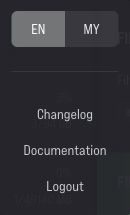
Use the three-dot button beside your account in the sidebar. The menu provides the installed language choices, Edit user when available, Changelog, Documentation and Logout. The user-agreement link is shown for the Russian interface.
¶ Language and account
Choose one of the installed interface languages. To add another language, install its language pack in Settings → Repository. After installation finishes, the language list updates automatically. You can select the new language without rebuilding or restarting the platform. If the active language pack is removed, the interface switches to English. Use Edit user to open your own account details; do not change another person's account without permission.
¶ Appearance is a separate page
Backgrounds and branding are configured in Settings → Themes, not in the account menu.
The platform's Changelog describes its installed software history. The Wiki's Documentation guide describes this documentation edition; it is not the platform release changelog.